UniPM
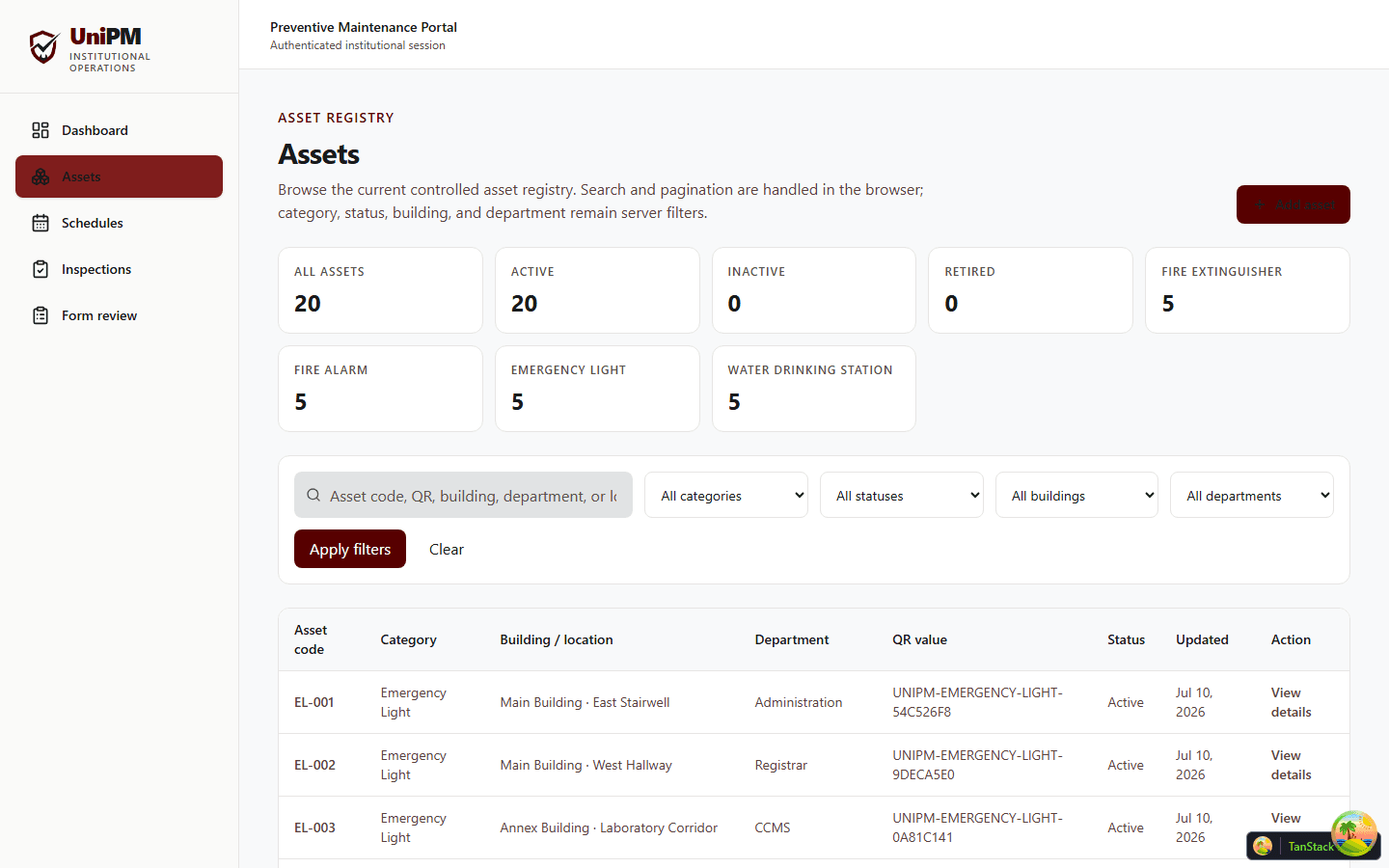
UniPM is a web and mobile preventive maintenance system developed for the General Services Department (GSD) of Manuel S. Enverga University Foundation. It brings equipment records, maintenance schedules, field inspections, digital forms, and reports into one system. GSD staff can manage equipment and review maintenance activities through the web application. Inspectors can use the mobile application to identify assets, complete inspections, and record findings in the field. Each asset can also be identified through its QR code.
The problem
The General Services Department maintains different types of university equipment. Each category has its own preventive maintenance requirements and inspection forms.
The existing GSD forms show these differences.
- Fire alarms: The form records device numbers, locations, operational status, inspection dates, and remarks.
- Fire extinguishers: The form also records equipment type, capacity, and expiration dates.
- Water drinking stations: The form includes operational checks, filter replacement activities, UV light checks, and accomplishment dates.
- Emergency lights: The form records equipment numbers, installation dates, locations, and operational status.
These forms do not use the same inspection fields. They also contain different maintenance activities.
A single generic checklist would not capture all the required information.
The department also needs to track maintenance schedules, review inspection records, consolidate results, and identify outstanding work. Staff must also endorse inspection findings that require corrective maintenance.
These requirements create a need for a shared system. It must support different equipment categories and their respective maintenance workflows.
UniPM Maintenance Workflow
UniPM follows the department's preventive maintenance process. The workflow separates inspection completion from form acknowledgement and corrective maintenance follow-up.
GSD creates a preventive maintenance schedule. The inspector identifies the asset and completes the inspection. The server records the completion time when it accepts the save. The inspection is added to a digital form, submitted, and acknowledged by the department head before entering official maintenance history. If the asset is operational, no corrective follow-up is required. If it is non-operational, the finding and recommendation are recorded, GSD or an authorized supervisor records the WMS PM number, and the matter is referred to the existing WMS.
Understanding the maintenance workflow
UniPM follows the department's Comprehensive Preventive Maintenance Program (CPMP).
The program defines the maintenance cycles and inspection requirements for each equipment category. The system uses these requirements to organize schedules and assignments.
Each asset has its own record and maintenance schedule. Inspectors record their findings through category-specific digital forms.
One preventive maintenance form can contain several asset inspections. These records belong to one department, asset category, and maintenance cycle.
This structure allows the system to manage multiple equipment inspections within one maintenance batch.
What I worked on
I worked on the ASP.NET Core backend. My work covered the APIs, database operations, and application rules that support the web and mobile applications.
My contributions included:
- Asset registry and QR code lookup.
- Preventive maintenance schedules and assignments.
- Inspection records and photo evidence.
- Digital maintenance forms and acknowledgement.
- Dashboard and reporting APIs.
- Natural-Language Analytics and report interpretation.
- Authentication and role-based authorization.
I also implemented rules that control inspection completion, form submission, acknowledgement, and maintenance history.
My teammate worked on the Flutter mobile application.
How UniPM works
1. Asset management and QR identification
The asset registry stores equipment details and connects each asset to its maintenance schedule and inspection history.
Each asset can be identified through its QR code. Staff can scan the code to find the corresponding equipment record.
The web application provides a central view of registered assets, categories, and maintenance information.
2. Preventive maintenance scheduling
UniPM organizes maintenance activities according to the CPMP requirements.
The system manages maintenance cycles, schedules, and personnel assignments. GSD staff can review upcoming and completed maintenance activities.
Each schedule is linked to its corresponding asset. This allows the system to track inspection progress at the equipment level.
3. Mobile inspections
Inspectors use the Flutter mobile application to find assets and complete inspection checklists.
The forms collect information based on the equipment category. Inspectors can record operational status, findings, remarks, and supporting photos.
The mobile application also supports offline draft recording. Inspectors can continue preparing inspection records when an internet connection is unavailable.
4. Digital forms and acknowledgement
A preventive maintenance form can contain several asset inspection records from one maintenance batch.
The form follows three states:
Draft → Submitted → Acknowledged
UniPM separates inspection completion from form acknowledgement.
When the server first accepts a completed inspection save, it records the completion time for that asset's schedule. This can happen before the entire form is submitted.
Submission sends the completed form for acknowledgement. The concerned department head acknowledges receipt of the form.
Acknowledgement does not change the original inspection completion time.
For new forms, only inspection records in acknowledged forms enter the official maintenance history. Draft and Submitted records remain outside that history.
This distinction keeps working records separate from acknowledged maintenance records.
5. Offline recording and synchronization
The mobile application stores encrypted inspection drafts on the device while offline.
It queues changes and synchronizes them when the connection returns. Inspectors can also review synchronization conflicts.
Submission, photo uploads, and acknowledgement require an internet connection.
The server-recorded completion time is the basis for maintenance reporting. Therefore, delayed synchronization can affect whether an inspection counts as on time.
6. Corrective maintenance handoff
An inspection can identify a problem that requires corrective maintenance.
UniPM prepares the relevant findings and recommendations for handoff. GSD staff then enter the corrective maintenance request into the department's existing Work Management System.
UniPM supports this handoff. It does not directly create, process, or track corrective maintenance work in the existing system.
Natural-Language Analytics
UniPM uses DeepSeek as the primary interpreter for its Natural-Language Analytics (NLA) feature.
The feature allows users to ask questions about preventive maintenance activities and registered assets. Users do not need to construct every report through manual filters.
For example, a user can ask a question about the number of registered fire alarms in a particular building.
DeepSeek interprets the question and proposes a structured report plan.
The system follows these steps:
- The user enters a natural-language question.
- DeepSeek interprets the request and proposes a report plan.
- The backend validates the requested report and its parameters.
- The user reviews and confirms the report plan.
- The backend executes the supported query.
- UniPM displays the calculated results.
The backend checks the report scope before execution. This includes the reporting subject, requested measures, equipment categories, periods, filters, and grouping.
The system also includes a deterministic rule-based interpreter as an alternative. Both interpretation paths use the same backend validation and reporting rules.
DeepSeek does not execute arbitrary SQL. It does not make maintenance decisions. It only proposes an interpretation that the backend must validate.
Key technical decisions
Separate inspection completion and form acknowledgement
Inspection completion and form acknowledgement represent different events.
An inspection can complete its maintenance schedule before the whole form is submitted or acknowledged.
Acknowledgement controls whether new inspection records enter official maintenance history. It does not change the recorded completion time.
This prevents delayed acknowledgement from changing the original inspection timestamp.
Support offline inspection drafts
Inspectors may work in areas with limited connectivity.
The mobile application can store encrypted drafts locally. It synchronizes queued changes when a connection returns.
Operations that require server confirmation remain online-only.
Validate AI-generated report plans
DeepSeek interprets the user's question and proposes a structured report plan.
The backend checks the plan before execution. Unsupported requests and incomplete questions receive appropriate responses.
This keeps report generation within the system's defined reporting rules.
Enforce access control on the backend
The API uses JWT authentication and role-based authorization.
The server controls access to maintenance operations. The web and mobile applications cannot independently authorize changes to official records.
System architecture
UniPM uses three main layers.
Presentation layer
- React web application for asset management, dashboards, schedules, forms, and reports.
- Flutter mobile application for QR lookup, inspections, and maintenance forms.
- Encrypted local draft storage and synchronization.
Application layer
- ASP.NET Core Web API.
- JWT authentication and role-based authorization.
- Asset registry and maintenance scheduling.
- Inspection and photo evidence management.
- Form submission and acknowledgement.
- Natural-Language Analytics and report generation.
Data and evidence layer
- Entity Framework Core for database access.
- Microsoft SQL Server for application records.
- Separate storage for inspection photo evidence.
The backend controls the application rules and database operations. Both clients communicate with the backend through the API.
Testing and evaluation
UniPM underwent backend, web, mobile, and workflow testing.
The repository contains:
- xUnit backend tests.
- Vitest web application tests.
- Playwright browser tests.
- Flutter application tests.
- SQL Server-backed integration checks.
- Workflow verification and demonstration records.
Natural-Language Analytics evaluation
Both DeepSeek and the deterministic interpreter were evaluated using the same set of 30 maintenance questions.
The final paired evaluation used the original questions and scoring rules. Both interpreters processed all 30 questions against the same controlled database fixture.
The results were:
| Measurement | DeepSeek | Deterministic parser |
|---|---|---|
| Correct interpretation status | 27/30 | 25/30 |
| Strict case agreement | 21/30 (70.0%) | 19/30 (63.3%) |
| Semantic case agreement | 23/30 (76.7%) | 22/30 (73.3%) |
| Successful HTTP responses | 30/30 | 30/30 |
Semantic case agreement checks the interpretation status, clarification fields, report-plan disposition, and complete plan.
DeepSeek achieved 23 successful semantic matches out of 30 questions. The deterministic interpreter achieved 22.
A separate staging check also verified the DeepSeek integration. The API selected DeepSeek without an explicit interpreter override and returned a valid report plan for a registered-asset question.
These results cover the evaluated development questions. They do not establish accuracy for unseen questions. The paired evaluation also did not execute the resulting numerical reports.
Usability evaluation
The System Usability Scale (SUS) was administered to ten respondents.
Three GSD staff evaluated the web application. Seven inspectors evaluated the mobile application.
The calculated results were:
| Evaluation group | Respondents | Mean SUS |
|---|---|---|
| Web application | 3 | 94.17 |
| Mobile application | 7 | 95.00 |
| Overall | 10 | 94.75 |
The results summarize the respondents' perceived usability of the two applications.
Current status and limitations
UniPM is a team capstone project. It has a verified staging environment, but this does not establish institution-wide production acceptance.
The mobile application supports offline draft recording. However, submission, photo uploads, and acknowledgement require an internet connection.
Corrective maintenance requests still pass through the department's existing Work Management System.
The system uses DeepSeek as its primary NLA interpreter. Its alternative deterministic interpreter has also undergone comparative testing.
The reported NLA results apply to a fixed development question set. They do not establish general performance on all possible questions.
Physical-device testing, institutional deployment, and formal university acceptance remain separate considerations.
What I learned
Working on UniPM required more than building APIs for equipment records and inspection forms.
I had to understand the department's maintenance procedures and translate them into application rules.
One important lesson was the need to separate inspection completion from form acknowledgement. These events look related, but they have different effects on maintenance records and reporting.
I also learned to keep important business rules on the backend. This was important because the web and mobile applications share the same maintenance data.
The project gave me practical experience in backend development, API design, database management, authentication, workflow implementation, AI integration, and web and mobile application integration.
It also helped me understand how software must reflect actual operational procedures, not only technical requirements.